Hindi Keyboard for Android
हिंदी कीबोर्ड
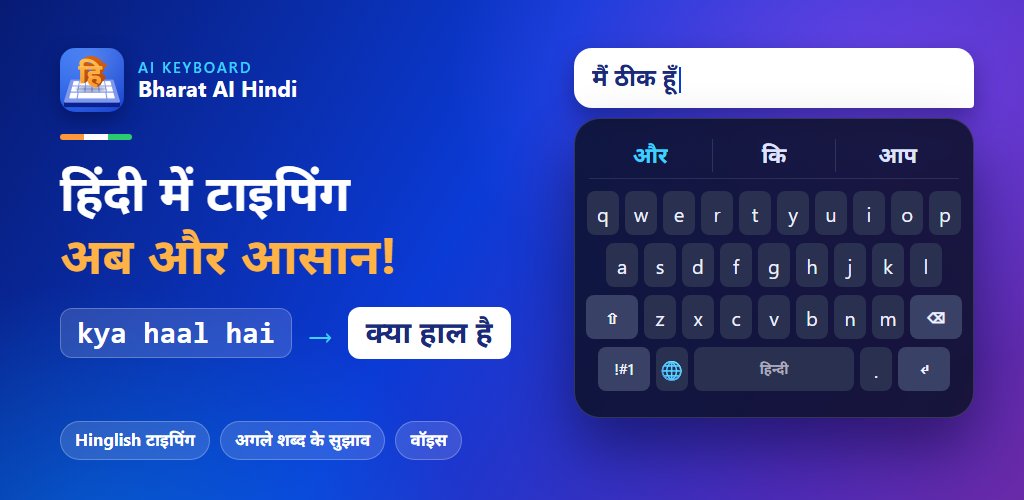
Bharat AI Hindi Keyboard lets you type in Hinglish and get हिन्दी script instantly — with smart next-word suggestions, Hindi voice typing and one-tap switching to English.
 Scan with your phone camera to install
Type Hindi in English letters
No Devanagari layout to memorise. Type phonetically and Bharat AI converts it to हिन्दी as you go.
| You type | You get | Meaning |
|---|---|---|
| kya haal hai | क्या हाल है | How are you? |
| namaste | नमस्ते | Hello |
| dhanyavaad | धन्यवाद | Thank you |
Why use Bharat AI Hindi Keyboard
Hinglish typing
Type Hindi words the way they sound in English letters and get हिन्दी script instantly — no need to learn a new layout.
Smart next-word suggestions
The suggestion bar predicts your next Hindi word so you can finish sentences with fewer taps.
Hindi voice typing
Tap the mic and speak in Hindi — your words appear as हिन्दी text.
Hindi + English together
Switch between Hindi and English with the globe key, without leaving your chat.
Themes, emoji & stickers
Personalise your keyboard with themes and express yourself with emoji, GIFs and stickers.
Privacy first
Bharat AI Keyboard never stores your passwords or card numbers. Read our privacy policy for details.
How to install the Hindi keyboard
- 1
Install Bharat AI Hindi Keyboard from Google Play.
- 2
Open the app and tap Enable keyboard.
- 3
Turn on Bharat AI Hindi Keyboard in Android settings.
- 4
Select it as your keyboard and start typing in Hindi.
Hindi keyboard FAQs
Is the Bharat AI Hindi Keyboard free?
Yes. Bharat AI Hindi Keyboard is free to download from the Google Play Store and works on Android 8.0 and newer.
How do I type Hindi using English letters?
Just type how the word sounds in English letters (Hinglish). For example, typing "kya haal hai" gives you क्या हाल है. Suggestions appear above the keys so you can pick the right word with one tap.
Can I switch between Hindi and English while typing?
Yes. Tap the globe key next to the space bar to switch between Hindi and English at any time without leaving your chat.
Does the Hindi keyboard work in WhatsApp, Instagram and other apps?
Yes. Once you set Bharat AI Hindi Keyboard as your keyboard in Android settings, it works in every app where you type, including WhatsApp, Instagram, Facebook, YouTube, Gmail and SMS.
How do I set Hindi keyboard as my default keyboard?
Install the app from Google Play, open it and follow the setup: enable Bharat AI Hindi Keyboard in Settings › System › Languages & input › On-screen keyboard, then choose it as your current keyboard.
What is the difference between the Hindi edition and the all-languages app?
The Hindi edition is set up for Hindi out of the box. The all-languages Bharat AI Keyboard app lets you switch between Hindi, Bengali, Tamil, Telugu and other Indian languages in one keyboard. Both are free.
Keyboards for other Indian languages
- বাংলাBengali Keyboard
- தமிழ்Tamil Keyboard
- తెలుగుTelugu Keyboard
- मराठीMarathi Keyboard
- ગુજરાતીGujarati Keyboard
- ಕನ್ನಡKannada Keyboard
- മലയാളംMalayalam Keyboard
- ଓଡ଼ିଆOdia Keyboard
- ਪੰਜਾਬੀPunjabi Keyboard
- অসমীয়াAssamese Keyboard
- नेपालीNepali Keyboard
The all-languages Bharat AI Keyboard switches between 14 languages in one keyboard.
- Hindi, Tamil, Bengali & more
- Translation inside the keyboard